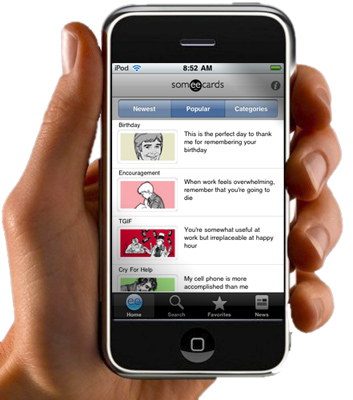
Even though it hasn’t yet passed the “Asian Boobs” app in downloads, our new iPhone app has some great non-bosomy features:
-Get the newest cards as they go live (content updates every time you load the app)
-Save cards as favorites
-Enjoy all the same categories that are offered on someecards.com
-Send something obnoxious from any questionable location!
The app will be updated regularly so we’d appreciate any feedback below. For example, should we consider adding images of Asian womens’ bare breasts? (And if you like the app, please spread the word!)
 someecards.wordpress.com
October 29, 2009 at 10:50 am
Woo hoo! Makes me wish I had an iPhone! Now get to work on the Blackberry version (please).
October 29, 2009 at 10:52 am
I purchased the app yesterday, however when I send ecards to a friend, all they get is a blank message once they click through to the site.
October 29, 2009 at 10:52 am
how bout nokia users who love someecards , can we?
October 29, 2009 at 10:53 am
Well, the app looks and feels great, but it seems like the link inside the email that’s being generated by the app is broken, as none of the cards I sent from it can be opened by the respective recipients.
Besides, it would be nice if I were able to link my existinc someecards.com account to the one in the app.
October 29, 2009 at 10:54 am
Let us make our own ecards, or at least view the user ecards through the app. Then it’ll be perfect for use at the bar!
October 29, 2009 at 11:16 am
Love it!! It’s addict/user friendly!
October 29, 2009 at 11:17 am
The demo guy’s hand needs his nails clipped.
October 29, 2009 at 11:17 am
Twitter and Facebook capabilities for sharing would be awesome
October 29, 2009 at 11:34 am
Thanks for all the feedback on the app. This is only v.1.0, so we don’t have all the features in there that we’d like yet. Facebook, Twitter and Create Your Own Cards are all things we’re looking into. The updates will be free.
Regarding broken links, we’re not seeing these issues, but if you find problems in the emails please forward them to feedback@someecards.com and we’ll figure out a fix.
Thanks.
October 29, 2009 at 11:59 am
I got it yesterday, it’s great! Much better than Asian boobs!
October 29, 2009 at 12:10 pm
If you’re seeing broken links check your email address in settings (click the “i” in the upper right). If you have a bad address in there it will cause problems. We’ll work on a check for this, but for now as long as you put a good email address in there you should be OK.
Thanks.
October 29, 2009 at 1:03 pm
I like the app, here are my comments/suggestions:
Comment: Using the app to send a card, the email the recipient receives contains an incorrect link, and thus cannot see the card.
Suggestion: It would be nice if somehow we could use the app to send a card to a facebook friend’s facebook wall.
October 29, 2009 at 1:41 pm
Just bought it, and very much like the set-up. That said, the first card I sent showed up as a question mark to the recipient. I sent it again, same thing. She uses a Mac, browser Safari (current).
October 29, 2009 at 1:44 pm
If you have any trouble sending cards, please send a card to feedback@someecards.com. That will help us troubleshoot. We should have this fixed very soon.
Thanks.
October 29, 2009 at 1:57 pm
Love this iPhone app!! Love it!
October 29, 2009 at 2:34 pm
Love it, but it definitely needs User Cards. That’s where the real money lies these days. All the kids’ e-card apps are doing it.
October 29, 2009 at 5:17 pm
[…] realize the hypocrisy in Apple’s ways just as much as anyone. But they’ve decided to get their app out there the only way they can and move their fight over to […]
October 30, 2009 at 6:35 am
[…] approved 99-cent iPhone app is indeed labeled for users ages 17 and up. Users can get access to the newest e-cards as they go […]
November 5, 2009 at 8:39 pm
The iPhone app doesn’t have all of the categories from the website! Unless you look cards up on the Internet first, then search for a particular word or phrase from a card, it doesn’t seem possible to get to all of the cards from the app, let alone browse them. Do y’all have a solution?
November 5, 2009 at 8:41 pm
Something seems to be off with the categories. We’ll look into it now and get a fix in place asap. Sorry about that.
November 5, 2009 at 10:33 pm
It’s fixed now. All the categories should be in there. Thanks for the heads up.
November 10, 2009 at 1:05 am
Why can’t anybody submit any usercards right now? Are you revamping the site AGAIN?
November 10, 2009 at 12:25 pm
User Cards is fixed now. Thanks for pointing out the issue. If you see problems like this in the future please send a note to feedback@someecards.com. Thanks.
November 25, 2009 at 8:06 pm
[…] realize the hypocrisy in Apple’s ways just as much as anyone. But they’ve decided to get their app out there the only way they can and move their fight over to […]
November 30, 2009 at 11:06 pm
[…] realize the hypocrisy in Apple’s ways just as much as anyone. But they’ve decided to get their app out there the only way they can and move their fight over to […]
October 21, 2011 at 12:22 pm
I realized whenever I sent an ecard with a small “e” in the thumbnail card, the recipient received only a blank email. Any solution? Does it mean we are not supposed to send any card marked with a small “e” (bottom right of the thumbnail card) from iPhone?
May 21, 2013 at 8:08 am
I bought the app but I can’t open it (iphone 4). I then downloaded the free app and same problem. I tried my work email and personal email addresses, and still nada. I even turned my phone off and on, but nothing. How do I fix this?
June 29, 2013 at 11:54 pm
You can wear and away from a posture inside 59 just a few
seconds, and in addition recognize exactly how much people stay to forfeit,
in addition to attain, having just about every industry that you simply make.
In this article, many of us can go over read more nights dealing, along with
methods you can use that will help you make far more successful positions.
read more gives a training curriculum with regard
to beginner merchants, from the training curriculum you’ll be able to utilize expert graphs, the particular read more, option contractor, the main one contact read more and even more. Contrary to a standard futures agreement which usually calls for you to definitely take supply from the solution for a potential moment in time, read more are definitely more similar to insurance, the place where a high quality is actually settled for an choice owner with the right to obtain, or market, the particular futures deal with a specific cost. The first is called a new call up choice, and that is a choice that’s purchased the spot that the
investor is convinced that it will truly go up throughout
benefit.
July 4, 2013 at 12:39 pm
Placement can often be pictured as essential Casino online it can be with zero restrict, but in limit low number of essential,
if a palm is worth taking part in there is
no need to get postpone by an increase throughout stakes.
When it is not really a excellent hands, and you also are earlier player(in additional text you might get increased by simply
in the future player)then crease, whilst in case
you are late player(fewer people possess opportunity to boost you)then you could operate by using it.
Your assurance may make other people sense a smaller
amount comfortable as well as cause them to become more likely to produce simple problems.
July 10, 2013 at 9:31 pm
That guarantees this trader the agreed payment as soon as how the
choice expires, along with basically eradicates the actual chances of any how
to profit from binary options brokerage having the ability to be a cheater his or her consumers when the exchange will be total.
Each is simple to operate as well as every features a distinctive rewards.
As long as they believe that the marketplace is going upward, they may
obtain what’s termed some sort of Phone option.
May 9, 2014 at 12:51 pm
Yes your e-card for Good Morning using The F-WORD is very disturbing to me.
The F-Word is such a terrible word for something that is so beautiful thing.
Your Website is terrible and I am going to report your company to the necessary people of concern of using cuss words.
May God Have Mercy On Your Soul,
Doug